Deborah R. Fowler
USD and Python
Posted June 11 2025
Updated on June 12 2025
Continuing on my USD journey I looked at two sites:
- https://openusd.org/release/tut_usd_tutorials.html
- https://www.nvidia.com/en-us/learn/learning-path/openusd/
Jupyter lab - why? for collaborative coding, I'll still with python on command line below. (if you do use Jupyter know that you have to use !python filename or %run to run your code.)
Other resources:
- https://developer.apple.com/videos/play/wwdc2022/10129/ (Apple General Overview)
- https://aousd.org/blog/explainer-series-what-is-openusd/ (Alliance for OpenUSD)
- "OpenUSD is more than just another file format; it’s a comprehensive ecosystem that addresses the complex needs of the 3D graphics industry"
- https://lucascheller.github.io/VFX-UsdSurvivalGuide/pages/introduction/motivation.html
(Production)
USD is a toolset for reading, writing, editing and previewing 3D data. It is "stackable" in non-destructive layers.
Hydra is an API for generating an image from a USD scene. USD consists of C++ libraries with Python bindings for scripting. There is also a concept of inheritance.
layers are files with scene information
Composition - is how the usd files are assembled (layering, referencing, payloads, variantSets)
- referencing (doesn't copy, refers) is. @./folder/object.usda@
- payloads (defer the data being referenced - for large scenes)
- layering (like photoshop)
- variantSets (variants, such as material binding, color)
Scene graph instancing - used to further optimize memory and
performance by reusing parts
LIVRPS (Local, Inherits, VariantSets, References, Payloads,
Specializes) strength ordering of opinions across composition arcs
Setting up for working with USD and Python
Note that python will need to be a version < 3.13 (and > 3.9 - I'm using 3.10)
In Windows in cmd you can type python --version to check your version
pip install usd-core
To create an empty USD stage where your 3D scene is assembled you use Usd.Stage.CreateNew(filename) where filename is the string. Another function that will be used below is Usd.Stage.Save()

There are multiple file tyes:
- usd (binary format, can be converted to ascii)
- usda - ascii (useful when learning and generating files from python)
- usdc - compressed binary - minimizes load time - efficient for heavy geo data
- usdz - zipped (not editable) but good for XR
Useful utilities for file formats: usdcat and usdedit can be used to create an ascii version of a usd file and usddiff for comparing
A simple example is given at https://openusd.org/release/tut_helloworld.htmlCreate your own (I used idle, can be created in any IDE or just with an editor like notepad++ and run command line with python filename)
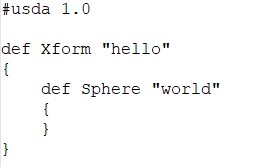
Because we are using ascii format (test1.usda) we can see the result:

A usda file is created that has a transform named "hello" (a prim) and a sphere name "world" (also a prim)
We can view the result in usdview (you can use usdview from Houdini's command line window OR install it independently).
How to install usdview for general use
If you want to use another IDE such as Visual Studio Code there are instructions https://docs.omniverse.nvidia.com/usd/latest/usdview/quickstart.html
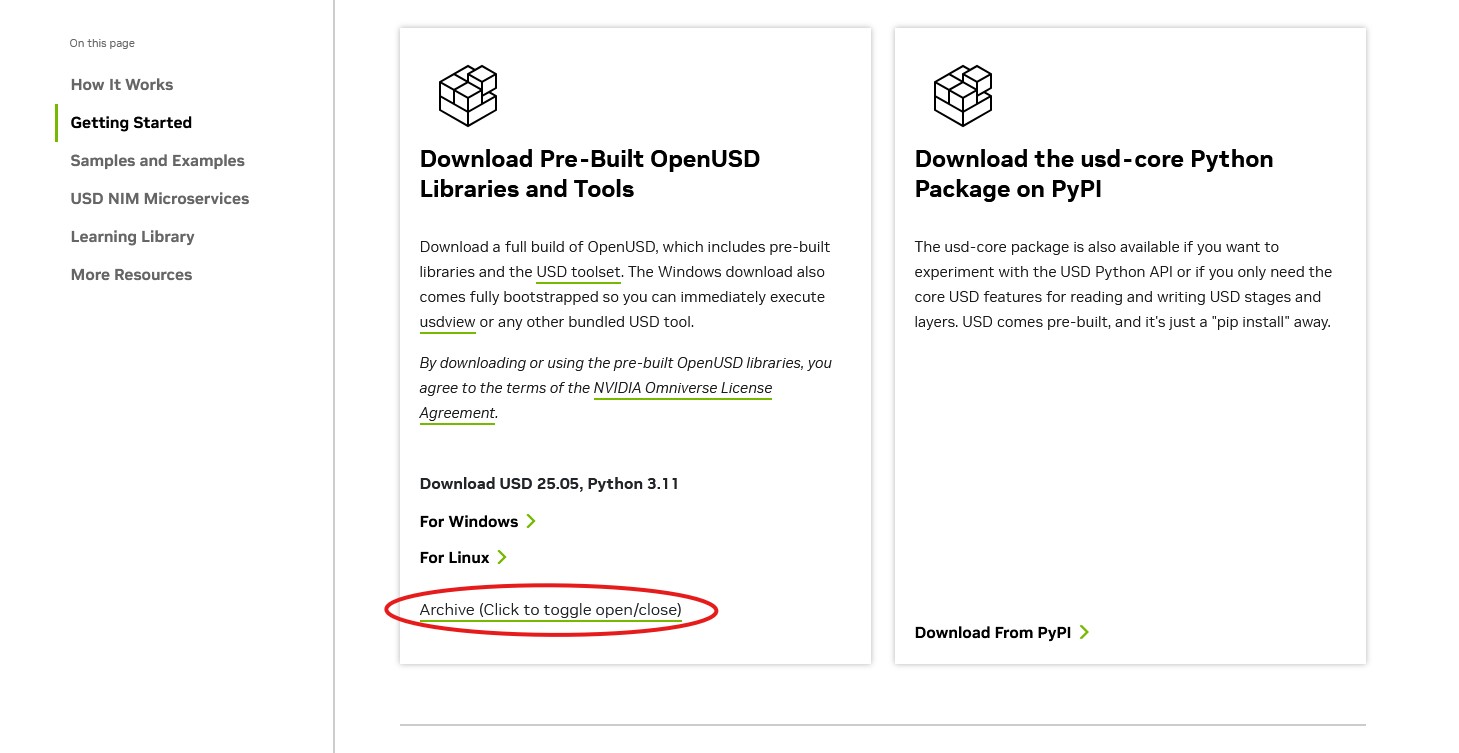
However, I wanted to keep this as simple as possible so I downloaded the appropriate version of the usdview tools (for Python 3.10) from here. It downloads a zip file that is then upzipped,
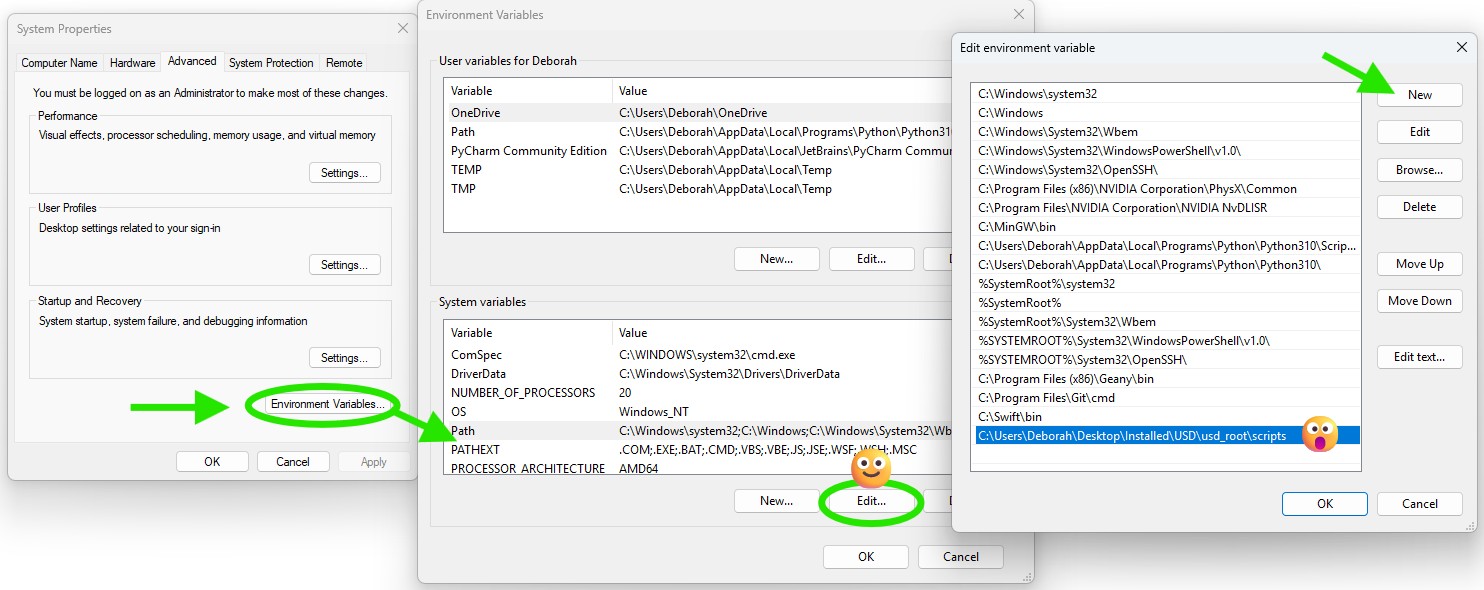
renamed it usd_root, and added to the systems path (windows). (Edit System Properties and Environment Variables)
Back to our file, you can now type in:
usdview test1.usda
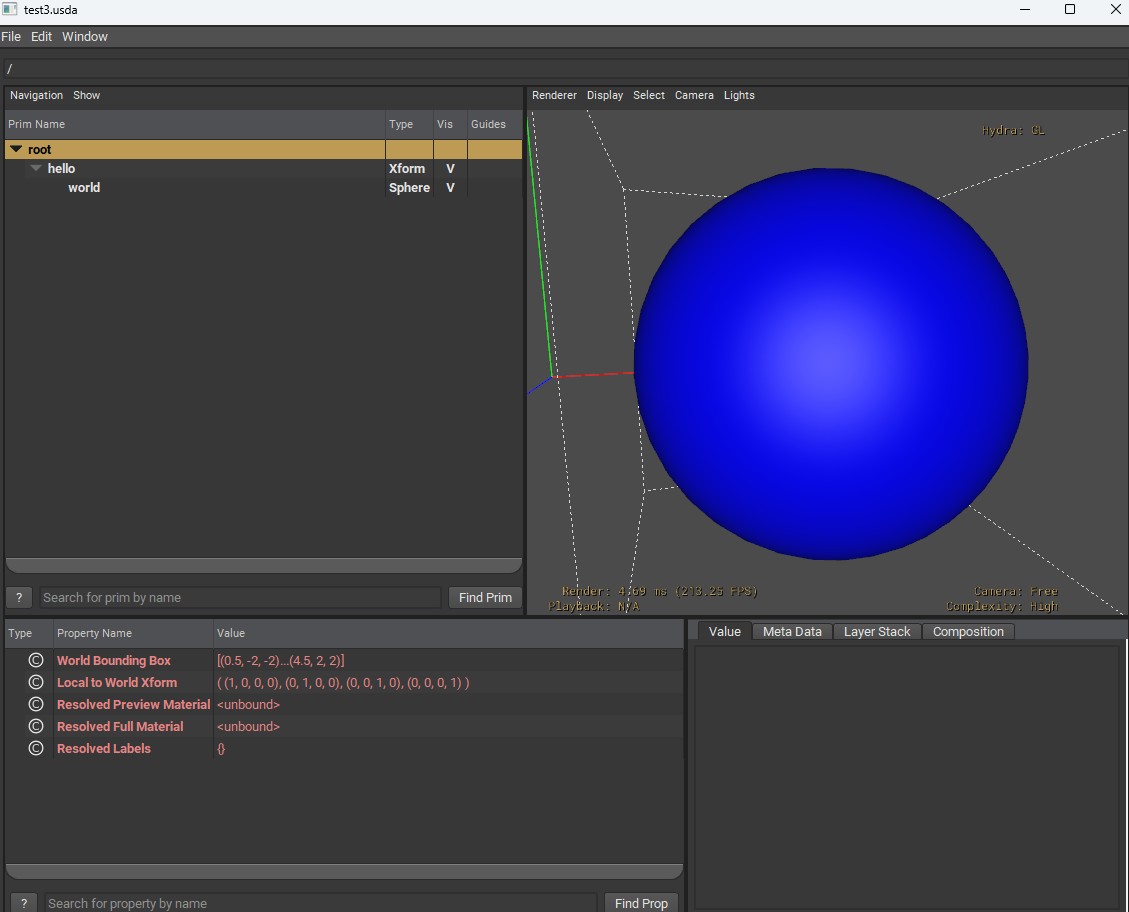
This brings up usdview of the file
We see our hierarchy. There are two ways this could have been coded:

The one on the left uses UsdGeom API, part of a built-in geometry schema; the right used typenames.

- UsdGeom.Xform.Define() is used to create a Xform prim - returns a schema object (UsdGeoXform instance)
- stage.DefinePrim() is a more general function creating any type of prim - returns a generic UsdPrim object
USD Schema define what kind of data prims can hold and how the data can be used. It defines the role of a prim. Schemas define structure and meaning to the data.
You can also type i in usdview and use python to look at the object: (such as usdviewApi.prim)
Prims - attributes and relationships
A prim is a container that has data (properties):
- attributes (typed data fields - time-sampled allows for
animation)
- relationships (connections - path-valued)
prim path is the unique identifier (each element is the
path between the "/" is a prim)
(primvar is a special attribute associated with a geometric prim
for rendering, ie. for per-primitive overrides to
shaders/materials for rendering - constant, uniform, varying,
vertex, faceVarying)
For example, visbility, display color, extent are attributes.
In the next example we can run a python script to change some
attributes on the sphere.
NOTE: A fallback value == default (when no opinions are authored - more later)
scope is like a folderxform is a prim (transform)
Schema - is like a blueprint or template (like a class in OOP) - defines attributes, relationships and metadata for a prim
Other core modules are
LUX - lighting
Sdf - scene description foundations - defines Usd data model: prims, attributes, relationships, metadata
Gf - graphics foundation (math related and utility - matrix, vector data)
Vt - value types module
Tf - tools foundations module
schema (types - IsA) - domains like GEOM, SHAD, LUX
schema specific API - add functionality, physics, shading ie. UsdPhysicsRigidBodyAPI, UsdShadeMaterialBindingAPI
metadata - can be defined on stage, prim, attribute
Next, we can open a usda file and edit it using a python script using Usd.Stage.Open('test2.usda'). Rather than typing i and interactively viewing the changes, I created a script to manipulate the previous result:
If you pipe this into a file.usda you can view it and see now have a blue sphere 2 units large translated 2.5 units over on the x-axis.


Rather than pipping to a new file you could also use:
stage.GetRootLayer().Save()
to save the changes directly to test2.usda
References
Adding to the script above the line allows us to use references
stage.SetDefaultPrim(xform)
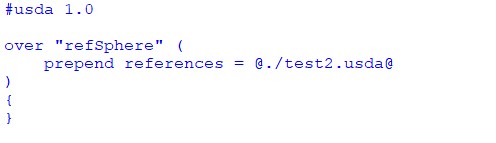
Results in:
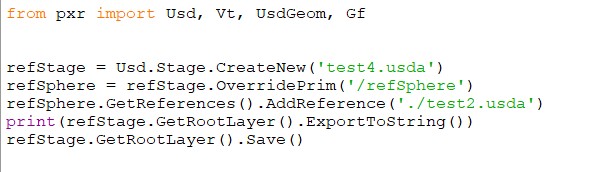
prepend is to ensure that the reference is inserted before any references that might be in weaker sublayers
Coding Guidelines
Interesting note while reading through the documentation, although growing up using K&R (Kernighan & Ritchie) format, I switched to Allman as my preferred indentation style while teaching as I found it easier to help students pick out bracing errors. I would highly recommend using only one of those two.
https://en.wikipedia.org/wiki/Indentation_style
USD coding guidelines suggest K&R
https://openusd.org/release/api/_page__coding__guidelines.html