VEX/VOPS and a little Python
For more information on Python in Houdini click here.
Also take a look at this description on odforce between hscript, vex/vops and python.
VOPS is Houdini's visual interface to VEX. Vex stands for Vector expression language. Both are native to Houdini. Introduced for writing shaders, expanded to SOPS, wranglers added ability to use VEX everywhere.
VEX is becoming more popular with the introduction of wrangle nodes and VEX snippets. (use for writing shaders and custom nodes). For examples of wrangle nodes, see page on wrangle nodes.
Both VEX and python code are easily integrated by using their corresponding nodes, however you may also use a digital asset as described below. This is handy for production sharing.
VEX looks similar to old rsl and C in terms of syntax. VEX is also very efficient (close to compiled C++ code). VOP is a pictoral representation of VEX code. Both can be used to create sops and are used in other contexts (dops, pops, shops). As of version 14 and up, vops are contextual (ie. point vop - (about 10x faster than the point SOP), attribute, primitive, vertex, volume VOPS).
To create the containers to place the code/nodes into:
- point VOP - create a node in the tab menu, for example Point VOP, dive in to play
- wrangle nodes (using VEX snippets)
- VEX requires an otl (digital asset) to store the code. The method to create a VEX sop was analogous
to creating a python sop which is described here or in
the example below, however in Houdini 16, there is one more
step. The Geometry Operator is deprecated in favor of cvex, so
if you want to use this method:
- create a vfl file with sop yoursopname() {} and then run vcc -l yoursopname.hda yoursopname.vfl
- Or use the preferred wrangle nodes as described above
TIP: on wrangle nodes, use the examples on the side (down pointing triangle) for quick syntax help
Python nodes can be created as described above, or simply through the tab menu.
(Alternatively you could also create a vfl file with VEX code and compile it using vcc to create an otl/hda). In H16 this is the only way to get a new geometry operator. See forum post https://www.sidefx.com/forum/topic/50606/
Once you have the otl created you can select the operator from your Digital Asset menu in the appropriate context and continue to refine your otl using the Edit VEX Function button on your node or use Type Properties and going to the Code tab.
- SideFX documentation on
- VEX
- VEX language reference
- VEX functions (built-in)
- Using VEX expressions (snippets)
- VEX compiler pragmas (for building UI in your nodes)
- Wagner's Webinars: Houdini VEX
- cgWiki on Houdini Vex
- cgWiki The Joy of Vex
An example of moving a point along a normal is given in the following sample files (zip files that contains the hda for the VEX python version - be sure to refresh your digital asset library). Updated for
Note that when you are using random you need to specify if it is 3D or 1D (if you see dotted lines on the connection it indicates a mismatch of variable type). So in the example of moving a point along a normal, be sure to set the random function to vector output.
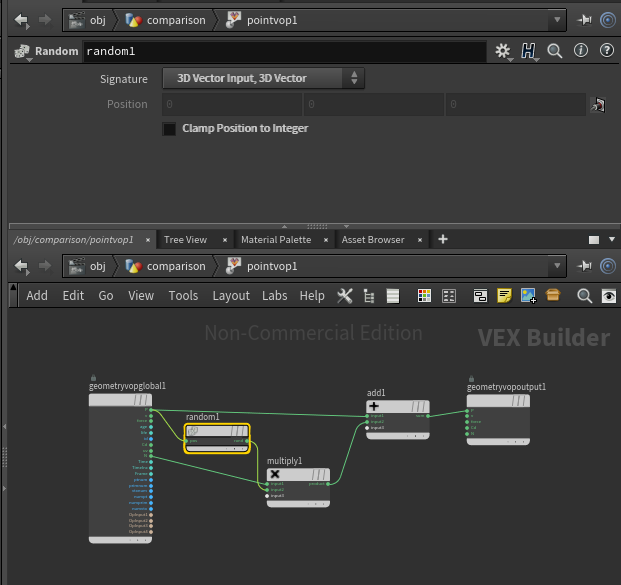
Note (H13): In the VEX and VOP version, the normal is automatically post recomputed, however in the python version it is not. A facet node is used to achieve the same result. (See forum post about normals). New to H14, VOPS no longer recomputes the normals, only VEX does. (Older: version 16, version 14, version 13.)
Lecture PDF for moving a point along a normal (updated for version 16) here.
For examples of vex snippets click here.
Example of zscale
Comparison of vex and vops noise — keep in mind you can
visualize the code by right clicking on a VOP node and you can
use the VOP functions inside of VEX by including the line .
An example is shown in this hip file between noise in wrangles (primitive) and a vop:
A note about VEXpressions (click on image for sample file H18.0.499)